Zengo Wallet: Keyless Self-Custody with MPC Security
Zengo Wallet redefines what it means to hold your own crypto. Unlike traditional wallets that rely on vulnerable seed phrases, Zengo uses Multi-Party Computation (MPC) to eliminate single points of failure. It’s a non-custodial wallet that gives you full control—without ever needing to write down a recovery phrase.
🧠 What Is Zengo?
Zengo is a mobile-first, self-custody wallet launched in 2018 by KZen Networks. It’s built as an independent product, not tied to any specific blockchain, and designed to be both beginner-friendly and institution-grade secure.
🔍 Key Highlights:
- 🔐 No seed phrase: Uses MPC cryptography instead of private keys
- 🧠 3FA recovery: Combines email, biometric FaceLock, and encrypted cloud backup
- 🛡️ Web3 Firewall: Built-in ClearSign engine flags risky dApp interactions
- 🧩 Multi-chain support: BTC, ETH, SOL, BNB, TRX, and 380+ assets
- 🖼️ NFT gallery: View and manage NFTs directly in-app
- 🧬 Legacy transfer: Option to designate heirs for asset continuity
- 🧰 Zengo Pro: Adds theft protection, private mode, and multiple wallets
🖥️ UI & User Experience
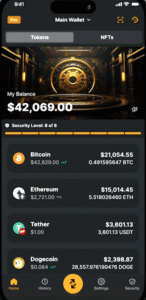
Zengo’s interface is sleek, intuitive, and designed for clarity:
- 🏠 Home tab shows balances and quick actions
- ⚡ Actions tab for Buy, Sell, Send, Receive, Earn, and Trade
- 📜 History tab tracks all transactions with timestamps and market data
- 👤 Account tab manages security, preferences, and support
The wallet is optimized for mobile use only (iOS/Android), with no desktop version. It’s ideal for users who want security without complexity.
🛠️ How to Use Zengo
🔹 Setup Instructions:
- 📲 Download Zengo from the App Store (https://apps.apple.com/us/app/zengo-crypto-bitcoin-wallet/id1440147115) or Google Play (https://play.google.com/store/apps/details?id=com.zengo.wallet&pcampaignid=web_share)
- 📧 Enter your email and confirm via magic link
- 🧬 Set up 3D FaceLock biometric scan
- ☁️ Finalize your Recovery Kit (encrypted file stored in iCloud or Google Drive)
- 🚀 Start sending, receiving, and exploring Web3 dApps
No seed phrase, no passwords—just secure, recoverable access.
Blockchain Optimization
🔷 Zengo Wallet
Zengo is optimized for multi-chain interoperability, with seamless support for both EVM-compatible and non-EVM blockchains. Its MPC architecture allows secure key management across diverse networks without compromising UX.
Blockchain Optimization Notes Ethereum (ETH) Full support for ERC-20 tokens, DeFi dApps, and NFT management Bitcoin (BTC) Native SegWit support, simple send/receive interface Solana (SOL) Integrated token and NFT support BNB Chain (BSC) Fast swaps and dApp access via Web3 Firewall Polygon (MATIC) Low-fee DeFi and NFT interactions Tron (TRX) Basic asset management, no staking Tezos, Avalanche, Arbitrum, Optimism Supported via WalletConnect and ClearSign engine Zengo is not tied to a specific chain—it’s built to be chain-agnostic, with a focus on security-first access across major ecosystems. Its Web3 Firewall adds a layer of protection when interacting with dApps on Ethereum, BNB, and Polygon.
🧭 Summary
Zengo Wallet is a next-gen self-custody solution that removes the friction and risk of seed phrases. With MPC architecture, biometric recovery, and built-in Web3 protection, it’s ideal for users who want security without compromise. Whether you’re storing NFTs, trading assets, or just getting started, Zengo offers peace of mind and full control.
Would you like this formatted for carousel posts or adapted into EN/UA bilingual layout? Ready to drop wallet #3?