RockWallet: Full Control, Simple Setup, Trusted Foundation
In the world of crypto, self-custody wallets are essential for users who want full control over their assets. Unlike custodial platforms, self-custody wallets ensure that only you hold the private keys—no middlemen, no centralized risk. RockWallet is one of the most accessible and secure options available today, offering a mobile-first experience built on trusted open-source code.
What Is RockWallet?
RockWallet is a non-custodial, multi-asset mobile wallet built on the original BRD (Breadwallet) open-source codebase. It launched in December 2022 and is developed by RockWallet LLC, registered as a Money Services Business (MSB) with FinCEN. The wallet is available on iOS and Android, and is designed for active traders and everyday users alike.
🔍 Key Highlights:
- ✅ Self-custody: You control your private keys and recovery phrase
- 🧩 Built on BRD code: Trusted foundation since 2014
- 📱 Mobile-first: No desktop client, optimized for on-the-go access
- 🔐 Security: 2FA, biometrics, PIN, and 12-word recovery phrase
- 💳 Buy/Sell/Swap: Integrated ACH, card payments, and native swaps
- ✉️ Paymail support: Simplified wallet addresses for BSV users
UI & User Experience
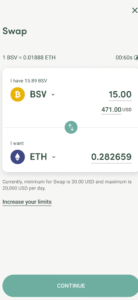
RockWallet features a streamlined interface with clear navigation:
- Home screen links to swap, buy/sell, and profile
- Express verification for fast onboarding
- “Sweep” function to transfer assets from old wallets in one tap
- SegWit support for BTC (beta)
- Activity tab shows transaction history per asset
It’s beginner-friendly, with tutorials and tooltips built into the app. While it doesn’t support staking or NFTs, its simplicity makes it ideal for users focused on secure storage and quick swaps.
How to Use RockWallet
🔹 Setup Instructions:
- 📲 Download RockWallet from the App Store (https://apps.apple.com/us/app/rockwallet-buy-and-swap/id6444194230) or Google Play (https://play.google.com/store/apps/details?id=lt.rockwallet.international)
- 🧾 Create a new wallet and verify your email
- 🔐 Set a 6-digit PIN and save your 12-word recovery phrase
- 🧍 Complete identity verification to unlock full features (Buy, Swap, Sell)
- 🚀 Start sending, receiving, and swapping crypto
Note: Without full KYC, you can still store and transfer assets, but buying/selling may be restricted based on region.
Summary
RockWallet is a secure, mobile-first self-custody wallet that gives users full control over their crypto. With its BRD foundation, intuitive UI, and built-in swap features, it’s a solid choice for anyone seeking simplicity without sacrificing security.