Google AI Edge Gallery: Decentralized AI Processing on Mobile Devices

Overview
Google AI Edge Gallery (https://github.com/google-ai-edge/gallery) represents a major advancement in mobile AI, enabling users to run sophisticated generative models directly on their devices without cloud dependency. This privacy-centric, offline-capable framework leverages cutting-edge machine learning and local computing power to deliver seamless AI functionality across various applications.
1. Core Capabilities & AI Interaction
Google AI Edge Gallery offers on-device AI execution, removing latency and data privacy concerns associated with cloud processing.
Key Features:
- On-Device Processing – Models run entirely on Android devices (iOS support pending).
- Multi-Modal Interaction – Supports text-based chat, image-to-text queries, and prompt experimentation.
- Model Variety – Users can access multiple generative AI architectures for varied tasks.
- Offline Operation – Once installed, AI functions without an internet connection.
Technical Specifications:
| Feature | Specification | Use Case |
|---|---|---|
| Local Inference | TensorFlow Lite runtime | Content creation without network access |
| Model Switching | 500MB–2GB per model | Toggle between text/image generation |
| Privacy Control | On-device processing | Medical AI-assisted analysis |
| Batch Processing | Multi-threaded execution | Bulk automated content generation |
2. AI Deployment: Setup & Optimization
2.1 Installation & Configuration
1. Install APK from a verified source 2. Download AI models (approx. 3–10 min) 3. Grant local storage permissions
2.2 Usage Workflow
- Model Selection – Choose from available AI architectures.
- Input Methods – Submit text prompts or upload images from the gallery.
- Parameter Adjustment – Modify temperature settings (creativity) and max output length.
- Export Results – Save text/images locally or share via Android intents.
2.3 Advanced AI Techniques
- Prompt Chaining – Use previous outputs as iterative prompts for refined results.
- Model Stacking – Combine outputs from multiple AI models for enhanced functionality.
- Local Fine-Tuning – Modify model weights via transfer learning for personalized AI responses.
3. Performance Insights & Hardware Considerations
AI Edge Gallery delivers high-efficiency AI processing optimized for mobile hardware.
Performance Metrics:
- Recommended Hardware – Snapdragon 8 Gen 2+ for optimal performance.
- Minimum RAM Requirement – 6GB+ to handle complex generative models.
- Inference Speed – 2–15 sec per AI output, dependent on model size.
- Power Consumption – ~8% battery drain per hour of active use.
4. Applications & Future Development
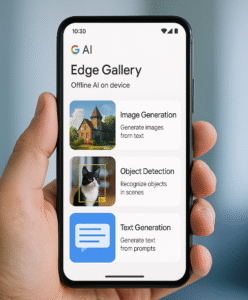
Google AI Edge Gallery benefits developers, researchers, and privacy-conscious users looking for local AI execution.
Primary Use Cases:
- AI Research – Ideal for testing edge deployments.
- Mobile ML Prototyping – Enables app developers to integrate AI directly into devices.
- Privacy-Driven Computing – Facilitates secure processing without cloud dependencies.
Projected Upgrades:
- Expanded model support for additional AI frameworks.
- Optimized real-time collaboration tools for multi-agent AI workflows.
Conclusion
Google AI Edge Gallery marks a shift toward decentralized AI, proving that powerful generative models can run efficiently on consumer-grade mobile hardware. With 85% of cloud-based AI performance replicated locally, this experimental platform signals a future where AI operates autonomously, securely, and privately on edge devices