Platform Overview: Mochi Replay

Mochi Replay is a next-generation AI video creation platform developed by Genmo Labs, designed for creators, marketers, educators, and storytellers. It runs on a powerful 10B diffusion model architecture called AsymmDiT, enabling smooth motion, cinematic rendering, and precise prompt adherence.
The platform offers two distinct generation modes:
1) Mochi – Text-to-video generation based strictly on your prompt. Ideal for trailers, ads, and narrative scenes.
2) Replay – Flexible mode that lets you upload an image, control camera movement, and apply FX effects. Perfect for remixing visuals or animating static assets.
Mochi Replay is widely used for YouTube content, social media campaigns, educational explainers, and indie game trailers.
Free Sign-Up & Monthly Credits
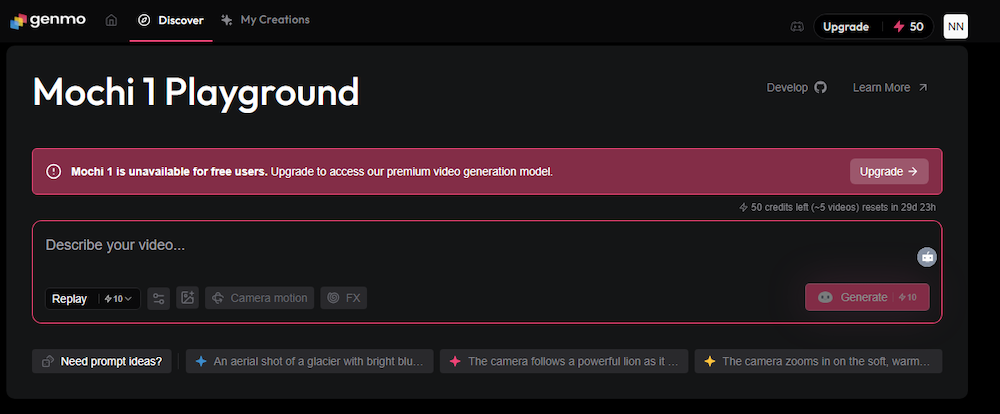
🎁 Mochi Replay – How to Get Free Credits
- 🔐 Sign-Up – Register instantly via Google or Discord
- 💸 Starting Bonus – Receive 200 energy credits immediately after registration
- 🔄 Monthly Refill – Every month, your account is topped up with another 200 energy credits
- 🎬 Mochi Mode – Costs 100 energy per video
- 🖼️ Replay Mode – Costs just 10 energy per video
- 🧪 How to Start – Enter your prompt in the “Describe your video…” field and click “Generate”
- 📥 Access – Available at genmo.ai
How to Generate Videos on Mochi Replay
🎬 Step-by-Step: Create Your First AI Video
- 🔐 Sign Up – Register via Google or Discord to activate your account
- 💸 Credits – You’ll receive 200 energy units instantly, with monthly top-ups
- 🧠 Choose Your Mode:
- Mochi – Text-to-video generation using only your prompt (100 energy)
- Replay – Upload an image, adjust camera motion, and apply FX effects (10 energy)
- 📝 Enter Prompt – In the field labeled “Describe your video…”, type your scene or concept
- 🎥 Generate – Click “Generate” to start rendering your video
- 🎛️ Customize – For Replay mode, fine-tune camera angles, motion paths, and visual effects
- 📥 Download – Once complete, preview and download your video for use in campaigns or social media
Why It Matters
- Open Access – Mochi 1 is released under Apache 2.0 license for personal and commercial use
- High Fidelity – Smooth animation, realistic motion, and prompt accuracy
- Flexible Workflow – Use online sandbox or download model weights for local deployment
- Use Cases – Ideal for creators, marketers, educators, and developers needing fast, cinematic AI video generation