CoolWallet: Physical Self-Custody with Mobile Convenience

CoolWallet is a sleek, credit card-sized hardware wallet that gives users full control over their crypto assets—offline, secure, and portable. Developed by CoolBitX, a Taiwan-based company founded in 2014, CoolWallet combines the security of cold storage with the convenience of mobile access. It’s ideal for users who want physical control of their keys without sacrificing usability.
What Is CoolWallet?
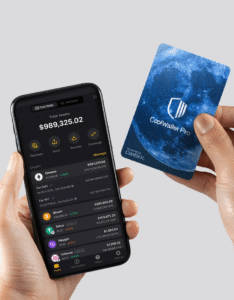
CoolWallet is a non-custodial hardware wallet that stores your private keys offline using a Secure Element chip. It connects to your smartphone via encrypted Bluetooth, allowing you to manage assets through the CoolWallet App (iOS/Android). The wallet is waterproof, tamper-proof, and bendable—designed for real-world durability.
🔍 Key Highlights:
- 🔐 Full custody: Private keys never leave the device
- 📱 Mobile-first: Controlled via app, no desktop required
- 🛡️ Secure Element chip: EAL5+/EAL6+ grade protection
- 🔄 In-app swaps, staking, and dApp access
- 💳 Form factor: Credit card-sized, fits in your wallet
- 🔋 Battery life: Up to 3 months per charge
CoolWallet comes in multiple models:
- CoolWallet Pro: Advanced security, supports 35+ blockchains, NFTs, staking
- CoolWallet S: Affordable version with core features
- CoolKey: Steel backup for seed phrases
- CoolWallet HOT: Software wallet managed via the same app
UI & User Experience
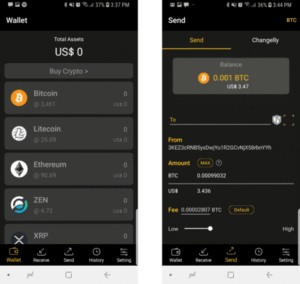
CoolWallet’s app is intuitive and clean:
- 🏠 Dashboard shows balances and quick actions
- 🔄 Swap tab for in-app token exchanges
- 🌐 Web3 browser for dApp access
- 📜 History tab for transaction logs
- 🔐 Security tab for biometric and password settings
The wallet itself has a small screen and button for confirming transactions, adding a physical layer of security. It’s designed for mobile-first users who want cold storage without bulky devices.
How to Use CoolWallet
🔹 Setup Instructions:
- 📦 Unbox your CoolWallet and charge it via USB dock
- 📲 Download the CoolWallet App from coolwallet.io or for Apple iOS (https://apps.apple.com/tw/app/coolwallet/id1328764142). Android fans can get APK by the link: https://apk.coolwallet.io/coolwallet-app.apk
- 🔐 Pair the wallet via Bluetooth and set up a password
- 🧾 Generate your seed phrase (via card or app) and back it up securely
- ✅ Confirm pairing and start managing assets
You can pair up to 3 phones with one wallet. Transactions require biometric authentication, visual confirmation on the card, and physical button press.
Chapter: CoolWallet Pro — Premium Cold Storage for Power Users
CoolWallet Pro is the flagship model in the CoolWallet lineup, designed for users who demand advanced security, multi-chain support, and Web3 functionality—all in a sleek, credit card-sized device. It’s ideal for DeFi participants, NFT collectors, and long-term holders who want full control without compromising mobility.
Benefits of CoolWallet Pro
CoolWallet Pro elevates self-custody with enhanced hardware and expanded blockchain support:
- 🛡️ Military-grade security: EAL6+ Secure Element chip
- 🌐 Web3-ready: Native dApp access via in-app browser
- 🧠 Multi-chain support: 35+ blockchains including Ethereum, Solana, Polygon, and more
- 🎨 NFT compatibility: View, send, and store ERC-721 and ERC-1155 assets
- 💰 Staking support: Stake assets like DOT, ADA, and TRX directly from the app
- 🔋 Long battery life: Up to 3 months standby per charge
- 📲 Mobile-first UX: Controlled entirely via encrypted Bluetooth and app
- 🔐 Biometric + physical confirmation: Adds dual-layer protection for transactions
CoolWallet Pro is built for users who want cold storage with hot features—ideal for active traders, DeFi users, and NFT collectors.
Features Overview
Feature Description Secure Element (EAL6+) Highest-grade chip for cold storage wallets Bluetooth Encryption AES256 encrypted pairing with mobile app Multi-Chain Support BTC, ETH, BNB, SOL, MATIC, XRP, ADA, DOT, KAS, TON, and more NFT Gallery View and manage NFTs directly in the app In-App Staking Stake ADA, DOT, TRX, and other supported assets Web3 Browser Access dApps like Uniswap, OpenSea, PancakeSwap Seed Phrase Recovery 12/24-word recovery via app or CoolKey backup Physical Confirmation Transactions require button press on the card Mobile App UX iOS/Android app with dashboard, swap, staking, and history tabs CoolWallet Pro supports DeFi, NFT, and staking workflows with cold storage security.
🛠️ 3. Setup Guide for CoolWallet Pro
Setting up CoolWallet Pro is simple but secure. Here’s a step-by-step breakdown:
🔹 3.1 Unboxing & Charging
- 📦 Open the box and remove the card, USB charging dock, and instructions
- 🔋 Charge the wallet fully before pairing (takes ~2 hours)
🔹 3.2 App Installation
- 📲 Download the CoolWallet App from coolwallet.io or app stores
- 🔐 Launch the app and select “CoolWallet Pro” during setup
🔹 3.3 Pairing & Security Setup
- 🔄 Enable Bluetooth and pair the wallet with your phone
- 🔑 Set a password and enable biometric login (Face ID or fingerprint)
- 📜 Generate a 12/24-word seed phrase and back it up securely (CoolKey optional)
🔹 3.4 Wallet Initialization
- ✅ Confirm pairing on both the app and wallet screen
- 🔘 Press the physical button on the card to approve setup
- 🧩 Add supported blockchains and tokens to your dashboard
🔹 3.5 Optional Features
- 🌐 Activate Web3 browser for dApp access
- 🎨 Enable NFT gallery view
- 💰 Start staking supported assets via the staking tab
🔐 Pro Tip: Always confirm transactions on the card screen and press the physical button to approve. This prevents remote tampering and ensures full custody.
🧭 Summary
CoolWallet Pro is a top-tier hardware wallet for users who want cold storage with full Web3 access. With its EAL6+ chip, mobile-first UX, and support for NFTs, staking, and dApps, it’s a powerhouse in your pocket. Whether you’re securing long-term holdings or actively engaging in DeFi, CoolWallet Pro offers unmatched control and convenience.
Would you like this chapter adapted into bilingual EN/UA format or formatted for carousel-style Telegram posts? I can also prep SEO metadata and alt text for your portfolio.
Blockchain Optimization
CoolWallet supports a wide range of blockchains and token standards:
| Blockchain | Optimization Notes |
|---|---|
| Bitcoin (BTC) | Native SegWit support, secure offline signing |
| Ethereum (ETH) | Full ERC-20, ERC-721, ERC-1155 support; NFT gallery and staking |
| BNB Chain (BSC) | BEP-20 tokens, PancakeSwap integration |
| Solana (SOL) | Asset management and staking via app |
| Polygon (MATIC) | Low-fee swaps and dApp access |
| TRON, XRP, Litecoin, Dogecoin | Supported for basic asset management |
| Kaspa, Toncoin, Horizen | Available in CoolWallet Pro with advanced features |
CoolWallet is ideal for users who want multi-chain cold storage with mobile convenience and physical security.
Summary
CoolWallet is a premium self-custody solution that combines the security of a hardware wallet with the flexibility of mobile access. With support for 35+ blockchains, encrypted Bluetooth, and a sleek card design, it’s perfect for users who want to own their keys and carry their wallet—literally. Whether you’re a long-term holder or an active trader, CoolWallet offers full control with zero compromise.