Kling AI 2.1: Revolutionizing Cinematic Storytelling

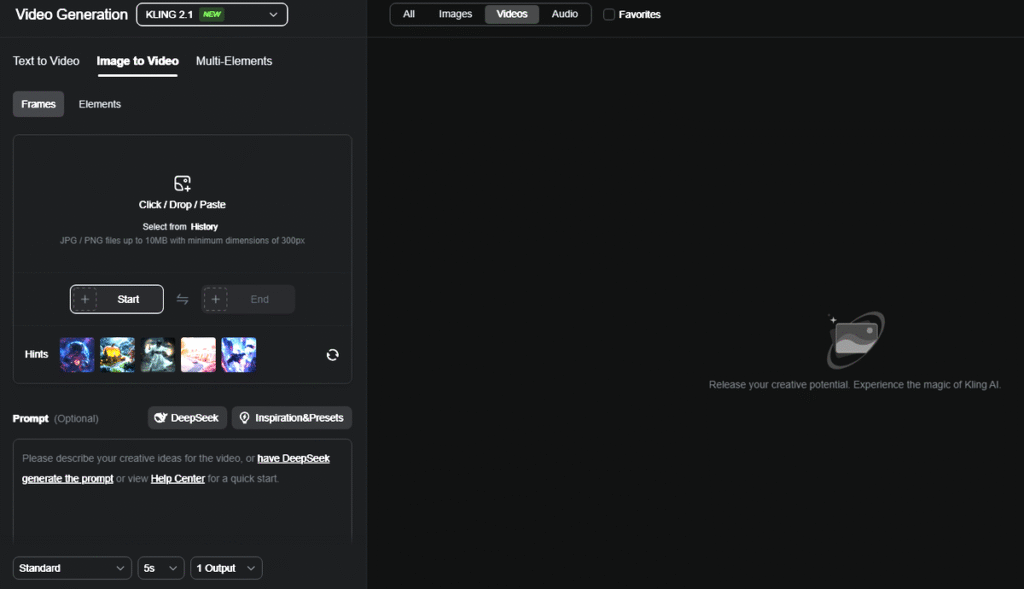
Kling AI 2.1 transforms AI-powered filmmaking, enabling creators to produce dynamic, cinematic videos for under $8/month. With its latest features and affordable pricing, this tool makes high-quality video production accessible while offering pro-grade controls. Here’s how to leverage its capabilities for stunning storytelling. Kling 2.1 allows you to build in mode Image-to-video high customizing video frames.
Budget-Friendly Professional Filmmaking
Kling 2.1’s Standard Plan ($6.99/month) provides 660 monthly credits, enough for multiple short films with smart workflow strategies. This tier includes:
– Watermark-free outputs
– 1080p HD resolution
– Full access to camera movement tools
– Basic video extension capabilities
For instance, a 15-minute film needs around 450 credits using scene segmentation and efficient prompting.
Key Features in Kling 2.1
- Extended Narrative Capacity
– Generate initial 2-minute video clips at 30 FPS
– Expand sequences to 3+ minutes with one-click extension
– Elements Feature: Maintain character/environment consistency using 4-image composites
- Cinematic Physics Engine
– Realistic object interactions and natural motion patterns
– Fluid dynamics for water/fire simulations
– Accurate cloth and hair movement
- Advanced Camera Control
| Movement Type | Creative Application | Prompt Example |
| Dynamic Zooms | Build tension | “Slow zoom from wide shot to character’s trembling hands” |
| Tracking Shots | Action sequences | “Sideways tracking shot following sprinting protagonist” |
| Dutch Angles | Psychological drama | “25° tilted frame for disorienting nightmare sequence” |
- AI-Powered Post-Production
– Automatic lip-sync for dialogue scenes
– Batch processing for efficient asset generation
– Multi-track audio integration with voiceover tools
Building Cinematic Shots: Step-by-Step
- Previsualization
– Use ChatGPT/Grok for shot lists with 3-act structure prompts
– Example: “Western showdown at high noon: 1) Wide desert establishing shot 2) Medium duelist close-ups 3) Low-angle bullet time sequence
- Shot Generation
– Base Prompt: “Medium shot, bounty hunter squinting under harsh sunlight, tumbleweed blowing past boots, camera dollying left”
– Motion Additions: “Add slow zoom + subtle handheld shake”
– Physics Parameters: “Dust particles react to foot movement, coat flaps in wind”
- Multi-Element Composition
– Upload character reference images to Elements Studio
– Combine environment/object assets using drag-and-drop interface
– Maintain lighting consistency through AI-assisted color grading
Seamless Scene Merging
– Temporal Alignment: Use Kling’s Clip Sequencer to match motion vectors between shots
– Audio-Visual Sync: Layer voiceovers with SFX using Audio Timeline
– Export Optimization: Render in 24FPS cinematic framerate, apply anamorphic lens LUTs for widescreen aesthetics
Ideal For
– Indie filmmakers needing test footage
– Content creators producing serialized narratives
– Ad agencies prototyping commercial concepts
By mastering Kling’s camera tools and workflow optimizations, creators can achieve Hollywood-grade visuals at a fraction of traditional costs. With continuous updates in physics simulation and asset management, even more powerful filmmaking capabilities are on the horizon.