Bloom Bot – High-Speed Solana Trading with AFK Automation

Bloom Bot (https://t.me/BloomSolana_bot?start=ref_MN32ZY1SZQ) is a Telegram-native trading bot built for Solana memecoin traders. It combines blazing-fast execution with automation tools like AFK Mode, sniper logic, and copy trading. Designed for both beginners and advanced users, Bloom simplifies trading with intuitive commands, real-time analytics, and secure wallet management—all inside Telegram.
The bot has an official Discord group chat (https://discord.com/invite/Bloom), and Discord server (https://discord.com/discovery/applications/975324072303017985) where participants can discuss different stuff.
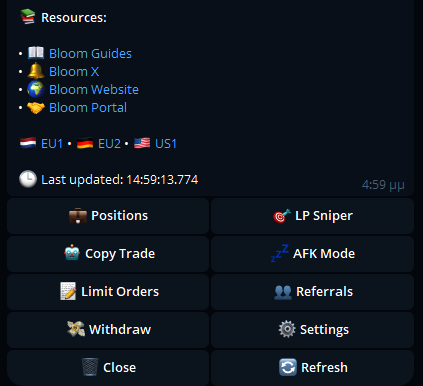
Bloom Bot Key Features
1 — Copy Trading
Mirror the trades of experienced wallets by entering their address in the Copy Trading settings. Customize filters and blacklists for precision.
2 — Limit Orders
Set buy or sell targets at specific price levels. Orders execute automatically when conditions are met.
3 — Sniper Bot
Auto-snipe token launches on Solana with minimal delay. Configure spend limits and trigger logic for fast entries.
4 — Multi-Wallet Support
Create, import, and switch between multiple wallets. Track performance and assign a default wallet for trades.
5 — MEV Protection
Enable anti-MEV shielding to prevent front-running. Jito processors are active by default for secure execution.
6 — Referral Program
Invite users to Bloom and earn rewards. Referral links also unlock fee discounts for new users.
Core Logic & Feature Breakdown

Bloom Bot – Core Features & Trading Logic
- ⚡ Fast Execution – Trades settle in under 1 block (~400ms) via Solana’s high-speed infrastructure
- 🛡️ MEV Protection – Toggle on/off; Jito processors engaged by default for secure execution
- 🧠 AFK Mode – Automate buy/sell actions based on custom rules while away from device
- 🎯 Auto Orders – Configure limit orders, take-profit, and stop-loss triggers post-purchase
- 📊 Fee & Slippage Control – Adjust transaction fees and slippage tolerance to optimize speed and price
- 🔥 Degen Mode – Auto-buy any token by pasting its contract address; bypasses confirmation for ultra-fast snipes
- 👥 Copy Trading – Mirror wallet activity by entering address; supports buy filters and blacklists
- 🔐 Multi-Wallet Management – Create, import, switch, and track multiple wallets with default wallet assignment
- 💸 Transparent Fees – 1% per trade; no hidden costs; referral discounts available
- 🏆 Community Tournaments – Regular trading competitions to engage and reward active users
How to Get Started with Bloom Bot
How to Get Started
1 — Launch Bloom Bot
Open Telegram and send /start to activate your Bloom account
2 — Secure Your Wallet
Bloom generates a Solana wallet automatically. Save your private key securely—never store it in Telegram or notes apps
3 — Fund Wallet
Use the /wallets command or navigate to the Wallets section to deposit SOL
4 — Configure Settings
Access /settings to adjust fees, slippage, and trading modes. Set buy/sell presets for faster execution
5 — Start Trading
Paste a token contract address or ticker to initiate trades. Activate Degen Mode for instant snipes
Summary
Bloom Bot is a top-tier MevX alternative for Solana traders who value speed, automation, and Telegram-native execution. Let me know if you want this modularized for affiliate flows, onboarding guides, or campaign rollout.